
The Facebook Pixel, which you'll now see called the Meta Pixel, is a small snippet of JavaScript code that you install on your website. It's the critical link between your site and your Meta ads, acting as an analytics tool that helps you understand what people are doing after they click your ad. This insight is what allows for smarter ad targeting and powerful optimisation.
What Is the Facebook Pixel and How Does It Work
Imagine the Meta Pixel is like a digital greeter at the front door of your website. Its job is to watch every visitor, taking notes on what they do—which pages they look at, what they put in their basket, and whether they buy anything. It then reports all this intel back to your Meta ad account.
This simple piece of code is the foundation of any serious advertising strategy on Facebook or Instagram.
At a technical level, the pixel works by dropping cookies that track users as they move around your website and interact with different elements. When someone takes an action you care about (which Meta calls an 'event'), the pixel "fires" and sends that data to your Events Manager. This connection is what makes everything from retargeting to conversion tracking possible.
The Power of Data Collection
The information the Meta Pixel collects completely changes the game for marketers. It lets you move away from just guessing what works and towards a strategy backed by real data. Instead of blasting your ads out to a massive, generic audience, you can focus your budget on people who have already shown they’re interested in what you offer.
This lets you do three crucial things:
- Measure Return on Ad Spend (ROAS): You can directly tie your sales and leads back to specific ad campaigns. This gives you a crystal-clear picture of your ROI.
- Optimise Ad Delivery: The pixel feeds performance data back to Meta's algorithm. The algorithm learns from this and gets better at showing your ads to people who are most likely to convert.
- Build Targeted Audiences: You can create Custom Audiences of people who visited your site to retarget them. Even better, you can build Lookalike Audiences to find brand new customers who behave just like your existing best ones.
This kind of insight is especially vital in digitally-savvy markets. In the UAE, for example, which has a 78% digital engagement rate for the Middle East, social media ads make up over half of all digital ad spending. For businesses trying to reach these mobile-first consumers, the Meta Pixel isn't just helpful—it's essential for tracking what really works. You can find more details on these trends in reports covering digital advertising in the MENA region.
Ultimately, the pixel is the bridge connecting what a customer does on your website with your advertising efforts on Meta’s platforms. It turns anonymous clicks into actionable data.
How to Set Up Your Meta Pixel and Track Key Events
Alright, let's get our hands dirty. Getting the Meta Pixel installed on your website is the first real step in moving away from just spending money on ads to actually investing it intelligently. The process boils down to two key parts: creating the pixel inside your Meta Business account and then placing its unique code onto your website. Think of it as installing a direct, open line of communication between your site and your ad account.
The good news is you don't need a computer science degree to pull this off. Meta has come a long way in making this accessible, offering a few different paths depending on your comfort level with code and the platform your website is built on. The main goal here is to pick the route that gets you up and running without any major headaches.
H3: Choosing Your Installation Method
You’ve got three main ways to get the pixel onto your site. Each has its pros and cons, so it's worth taking a moment to figure out which one makes the most sense for you, your team, and your long-term goals.
Deciding how to install the Meta Pixel is a critical first step. Your choice will impact how easily you can manage tracking in the future, so consider your technical resources and what you want to achieve. The table below breaks down the three main options to help you choose the best fit.
Choosing Your Meta Pixel Installation Method
| Method | Best For | Pros | Cons |
|---|---|---|---|
| Manual Installation | Developers or those comfortable editing website code directly. | Ultimate control and customisation. | High risk of errors if you're not a coder; can be tedious. |
| Partner Integration | Most businesses using platforms like Shopify, WooCommerce, or Squarespace. | Incredibly simple and fast; often just copy-paste a Pixel ID. | Can be less flexible; you're limited to what the platform supports. |
| Google Tag Manager | Businesses that manage multiple tracking scripts (e.g., Google Analytics, Hotjar). | Centralises all your tags; no need to touch site code after initial setup. | Has a learning curve; requires setting up Google Tag Manager first. |
Ultimately, the best method is the one that gets your pixel installed correctly and efficiently. For most businesses, especially in e-commerce, the Partner Integration is the clear winner for its simplicity and reliability.
Key Takeaway: If you're running a store on a major platform, just use the built-in partner integration. It’s almost always the quickest and most foolproof way to get started, ensuring critical events like purchases and add-to-baskets are tracked right out of the box.
H3: Configuring Standard Events to Track User Actions
Once that little piece of pixel code is live on your site, it starts tracking basic page views automatically. But that's just scratching the surface. The real magic happens when you start tracking specific user actions, which Meta calls standard events.
These events are what give your data meaning. They tell you exactly what people are doing—or not doing—on your site, providing the raw material you need for sharp retargeting and powerful ad optimisation. Think of them as signposts along the customer journey. By tracking them, you give Meta's algorithm the clues it needs to find more people like your best customers.
Here are the absolute must-have standard events you need to set up:
- ViewContent: This fires when someone lands on a key page, like a specific product or a service description. It’s the first sign of genuine interest.
- AddToCart: This is a big one. It tracks when someone puts an item in their basket, signalling strong buying intent. This is the bedrock of any good abandoned basket campaign.
- InitiateCheckout: When a user clicks that "checkout" button and starts the payment process, this event fires. These are your hottest leads—they're just a step away from buying.
- Purchase: The finish line. This is the most important conversion event, triggered when a transaction is successfully completed. It’s how you calculate your return on ad spend (ROAS) and prove your ads are working.
Getting these events set up correctly isn't optional; it's essential. For instance, by tracking the AddToCart event, you can easily build a Custom Audience of everyone who added products to their basket but never finished the purchase. Then, you can hit them with a targeted ad showing the exact items they left behind—a classic, high-converting tactic.
If you use a partner integration, these e-commerce events are usually set up for you automatically. If you're going the manual route, you'll need to add a small line of event code to the right pages. For example, you'd add the fbq('track', 'Purchase'); snippet to your order confirmation or "thank you" page.
Taking the time to get this right from the beginning is one of the smartest things you can do. It ensures the data flowing into your ad account is clean, accurate, and actionable, setting the stage for more profitable campaigns down the road.
Putting Your Pixel Data to Work in Advertising
Alright, so you’ve got the Meta Pixel installed and humming along on your site. Think of it like opening the tap on a massive pipeline of data. Now, the real magic begins: turning that raw data into advertising that actually gets results.
With the pixel feeding you information, you can finally move past the "spray and pray" approach. You're no longer just shouting your message into the void. Instead, you're having intelligent, data-backed conversations with your audience. This data becomes the fuel for three of Meta's most powerful advertising strategies: razor-sharp retargeting, building high-value lookalike audiences, and letting the algorithm optimise your ads for you.
This is the turning point where your ad spend starts working smarter, not just harder. Instead of guessing who your best customers might be, the pixel shows you exactly who they are, letting you focus your budget with surgical precision.
Laser-Focused Retargeting Campaigns
The quickest win you'll get from the Facebook Pixel is the ability to run killer retargeting campaigns. It's all about bringing back those "window shoppers"—the people who visited your site, showed interest, but left without taking that final step. You can dive deeper into the concept with guides like What Is Retargeting in Digital Marketing?, but the core idea is simple: re-engage warm leads.
Let’s paint a picture. Someone lands on your e-commerce store, finds a product they love, and even adds it to their basket. Then, life gets in the way, and they click away. Without the pixel, that's a lost sale. With the pixel, it’s a golden opportunity.
You can create a Custom Audience of everyone who triggered the 'AddToCart' event but not the 'Purchase' event in the last 14 days. Then, you can run an ad on their Facebook or Instagram feed showing them the exact product they left behind. It’s a gentle, timely nudge that’s often all it takes to close the deal. This isn’t just advertising; it's a personalised follow-up system that runs on autopilot.
Finding New Customers with Lookalike Audiences
Once you have a solid understanding of your ideal customer (thanks to your pixel data), the next question is obvious: "How do I find more people like them?" This is where Lookalike Audiences come in, and honestly, they're one of the most incredible tools in Meta's entire advertising suite.
It works like this: you give Meta a "source audience" built from your pixel data—say, everyone who made a purchase in the last 90 days. Meta's algorithm then gets to work, analysing the shared demographics, interests, and behaviours of that group. From there, it scans its billions of users to find a new audience of people who "look like" your best customers but have never even heard of your brand.
This is how you scale your business intelligently. You’re not just casting a wider net; you're casting a smarter net into a pool of people who are statistically primed to be interested in what you sell.
Automated Ad Optimisation
Finally, all that rich conversion data from your pixel gives Meta's ad delivery system the feedback it needs to get smarter. When you set up a campaign and optimise for conversions (like purchases or leads), you're giving the algorithm a clear goal. The pixel is what tells the algorithm if it's hitting that goal.
Here’s a breakdown of the process:
- Initial Test: Meta shows your ad to a small slice of your target audience to see who bites.
- Pixel Feedback: The pixel reports back in real-time, telling the system who is actually converting.
- Smart Optimisation: The algorithm spots patterns among the converters and starts showing your ad to more people who share those winning characteristics.
This creates a powerful feedback loop. The more conversions your pixel tracks, the better the algorithm gets at finding more converters. Over time, your campaigns become more and more efficient, driving down your cost per acquisition. For any business serious about growth, mastering paid advertising is non-negotiable. Expert guides on PPC in Dubai can offer a much deeper dive into building these kinds of winning strategies. Of course, all this optimisation is useless without great creative. Using a tool like Poster.ly can help you quickly create and schedule the kind of engaging visuals your newly optimised campaigns need to truly shine.
Why You Need the Conversions API Alongside Your Pixel
For a long time, the Meta Pixel was the go-to tool for tracking website activity. It was a reliable workhorse for advertisers. But the digital world has changed. With ad blockers on the rise and browsers cracking down on tracking, relying only on the pixel is like sailing into a storm with just one sail. It just won't get you where you need to go anymore.
This is exactly where the Conversions API (CAPI) comes in. Think of it as a secure, direct line from your website's server straight to Meta's. While the pixel sends data from a user's browser (what we call client-side), CAPI sends it from your server (server-side). This server-to-server connection is tougher and more dependable.
Why does that matter? It neatly sidesteps the browser-level roadblocks that often stop or mess up pixel data. The end result is a cleaner, more complete stream of information, catching those crucial user actions that the pixel, flying solo, might otherwise miss. Pairing them up is essential to future-proofing your entire advertising strategy.
Building a More Resilient Tracking System
The real magic here isn't about replacing the pixel—it's about giving it a powerful partner. The Meta Pixel and Conversions API are designed to work together as a team. The pixel is fantastic for capturing early interactions and building retargeting lists, while CAPI acts as a robust backup for the most important conversion events, like purchases or sign-ups.
When you use both, Meta gets two signals for the same action. To avoid counting everything twice, it uses a smart process called event deduplication. By matching a unique event ID sent from both the pixel and CAPI, Meta combines the two signals into one clean, accurate record of what a customer did.
This tag-team approach unlocks some serious benefits:
- Improved Measurement: You catch more conversion events, giving you a much truer picture of your campaign performance and return on ad spend.
- Enhanced Ad Optimisation: With better data feeding its algorithm, Meta gets much smarter at finding and showing your ads to people who are actually likely to convert.
- Better Audience Building: A fuller data set lets you build more precise Custom Audiences and far more effective Lookalike Audiences.
The image below shows how this higher-quality data directly powers the core functions of your advertising.
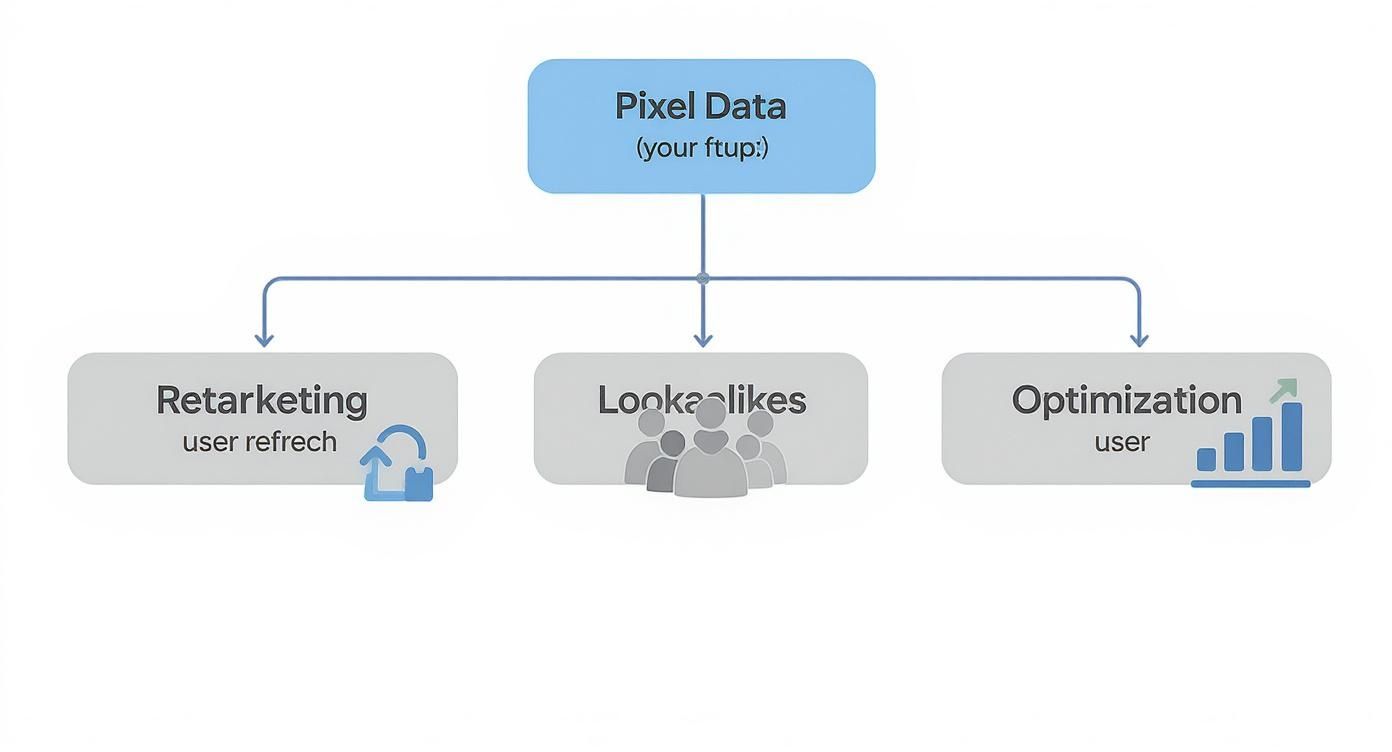
As you can see, everything from retargeting to optimisation gets a major boost when you feed the system better, more reliable information.
To make this crystal clear, let's break down how the Pixel and CAPI work together. They aren't competitors; they're collaborators, each covering the other's weaknesses.
Pixel vs. Conversions API: A Collaborative Approach
| Feature | Meta Pixel (Client-Side) | Conversions API (Server-Side) | Combined Benefit |
|---|---|---|---|
| Data Source | User's web browser | Your website's server | Full-funnel visibility, capturing both online and offline events. |
| Reliability | Susceptible to ad blockers, ITP, and network issues. | Unaffected by browser-level restrictions or ad blockers. | Creates data redundancy; if one channel fails, the other serves as a backup. |
| Data Control | Limited control over what is sent. | Full control over what data is shared and when. | Allows for sharing of deeper insights (e.g., CRM data) while respecting privacy. |
| Key Use Case | Top-of-funnel tracking, audience building, real-time events. | Lower-funnel conversions (purchases, leads), offline events. | A complete, deduplicated view of the entire customer journey. |
This combined system ensures you're not just getting some of the data, but the most complete picture possible, which is a game-changer for campaign performance.
The Impact of Advanced Tech Adoption
Adopting a sophisticated setup like the Pixel and CAPI combination is a move that keeps you ahead of the curve. Just look at the UAE, which leads the world in AI adoption—an incredible 59.4% of the working-age population uses AI tools at work. This environment means marketers are already primed to work with advanced data streams.
By integrating Pixel and CAPI data into AI-driven platforms, they can unlock predictive analytics, fine-tune campaigns with incredible precision, and map customer journeys in ways that just weren't possible before.
Crucial Insight: The whole point is to create data redundancy. By sending event data through two separate channels—the browser and the server—you build a system that’s much harder to break. If one signal gets blocked, the other can still get through, keeping your measurement intact.
Ultimately, pairing the Conversions API with your Facebook Pixel isn't just a technical upgrade. It’s a strategic shift away from a fragile, single point of failure towards a robust, multi-channel data system. This is what modern advertising demands, ensuring your decisions are based on the best data you can get. This level of accuracy is the bedrock of any winning campaign, a topic we dive into in our guide to data analysis for marketing.
Troubleshooting Common Meta Pixel Problems
Even the most carefully set-up Meta Pixel can hit a snag. Think of this as your field guide for spotting and fixing the usual suspects that can mess with your data and, by extension, your campaign results. Getting ahead of these issues is crucial—it keeps your tracking sharp and your ad spend smart.
Your number one tool for this is, without a doubt, the Meta Pixel Helper. It's a free Chrome extension that basically gives you x-ray vision into your website's pixel activity. Once it's installed, it’ll light up to show you if a pixel is on the page, if it fired correctly, and most importantly, if it ran into any errors.
Seriously, this little tool is your first line of defence. It helps you catch problems in real-time that might otherwise fly under the radar for weeks, quietly draining your ad budget.
Using the Meta Pixel Helper to Diagnose Issues
The Pixel Helper is fantastic for spotting common headaches. The best way to use it is to simply browse your own site like a customer would, keeping an eye on the extension's icon.
Here’s what you’re looking for:
- Pixel Not Firing: Is the Pixel Helper icon staying grey? That means it can't find any pixel code on that page. Maybe the code was accidentally deleted during a site update, or the installation just didn't take.
- Duplicate Pixels: The tool will throw a warning if it detects the same pixel firing more than once on the same page. This usually happens when you've installed it in two different ways (like with a plugin and by manually adding the code), which will totally skew your data.
- Event Mismatches: Sometimes you'll see an event fire, but it's the wrong one for that page. A classic example is a 'Purchase' event firing on a product detail page instead of the final thank-you page. This tells you the event code is simply in the wrong spot.
Expert Tip: Every now and then, do a quick "test purchase" or walk through your key conversion paths with the Pixel Helper running. It only takes five minutes, but it can save you from making big decisions based on bad data.
Tackling Problems in Events Manager
While the Pixel Helper is your go-to for on-site checks, your command centre for pixel health is the Events Manager in your Meta Business Suite. This is where Meta flags the deeper, more technical stuff that can impact data quality.
Two of the most common warnings you’ll see in there are all about how well Meta can connect your website events to actual people on their platform—a critical part of making your ads work.
- Low Event Match Quality Score: You'll see this score rated from poor to great. It's a measure of how successfully Meta can link a pixel event back to a specific user account. If the score is low, your ad optimisation will suffer. The fix? Make sure Advanced Matching is on and you’re passing as much customer info (like hashed email addresses and phone numbers) as you can.
- Event Deduplication Errors: If you're running both the Pixel and the Conversions API, you might bump into this one. It happens when Meta gets a signal from the browser and your server for the same action but can't tell they're the same event. To solve this, you need to generate a unique Event ID and send it with the event from both sources.
Sorting these issues out ensures the data you're feeding into your ad campaigns is as clean and complete as it can be. For businesses wanting to simplify their social media workflow, a platform like Poster.ly can help manage creative scheduling, ensuring the great ads you're running actually reach the highly-targeted audiences your well-tuned pixel has identified.
This is especially vital in growing regions. Since 2012, Facebook’s user base in the Middle East and North Africa has jumped by 29%, bringing in over 10 million new users. That kind of growth makes precise tracking more valuable than ever. You can learn more about Facebook's growth in the MENA region to get a better sense of the opportunity.
Navigating Privacy Changes and User Consent
The ground has permanently shifted under our feet in the world of digital advertising. The old "track everything" playbook is officially dead, and for good reason—user privacy is now front and centre. This new reality, driven by regulations like GDPR and Apple's App Tracking Transparency (ATT), completely changes how the Meta Pixel can and should work.
To make the Pixel work for you today, you have to strike a new balance. It's about respecting people's choices while still getting the insights you need to run smart campaigns. Frankly, this isn't just about avoiding fines; it's about building trust. Being upfront about how you use data is now a fundamental part of good marketing.
Compliance and Consent Are Non-Negotiable
Gone are the days of quietly collecting data in the background. Your first move has to be setting up a clear, compliant way to get user consent. This is one area where you absolutely cannot cut corners. The penalties for getting it wrong are steep, and the damage to your brand's reputation can be even worse.
Here’s the bare minimum you need to have in place:
- A Clear Privacy Policy: Your website must have a privacy policy that’s easy to find. It needs to spell out that you use the Meta Pixel, what data you collect, and what you do with it. No jargon, just plain language.
- An Effective Cookie Consent Banner: Before a single pixel fires, visitors need to see a clear choice to accept or reject tracking cookies. This can't be a pre-checked box or hidden in a footer; it must be an active, informed choice.
Privacy rules are always changing, so you have to stay on top of them. Resources like a thorough GDPR compliance checklist are invaluable for making sure your setup respects user rights and stays on the right side of the law.
Adapting to Apple's ATT Framework
When Apple rolled out its App Tracking Transparency (ATT) framework, it was a massive wake-up call. It forced apps to ask for explicit permission to track users across the web, and unsurprisingly, a lot of people said "no." For advertisers, this meant a huge chunk of data from iOS 14.5+ users suddenly vanished.
Meta’s response to this is called Aggregated Event Measurement (AEM). It’s a system designed to measure web events from iOS users in a way that respects their privacy settings. But it comes with a big catch: you can only track and optimise for a maximum of eight conversion events per domain.
Crucial Takeaway: You have to be strategic. Head into your Meta Events Manager and manually prioritise your top eight events. For an e-commerce store, this usually means putting ‘Purchase’ at the very top and working backwards through your funnel with events like ‘InitiateCheckout’ and ‘AddToCart’.
This ranking tells Meta what matters most to you. It helps the algorithm find the right people for your ads, even when it's working with incomplete data. Nailing this setup is a critical piece of modern https://grassrootscreativeagency.com/marketing-campaign-tracking/. And once your tracking is dialled in, you can focus on your creative. A tool like Poster.ly can help you design and schedule visuals that actually stop the scroll.
Got Questions About the Meta Pixel? We've Got Answers.
Even after you've got the Meta Pixel up and running, a few questions are bound to pop up. It's totally normal. Let's clear up some of the most common ones so you can feel confident about the data you're collecting.
Can I Use the Facebook Pixel Without a Website?
In a word, no. The Meta Pixel is built from the ground up to live on a website you own. Its entire job is to watch what people do on your web pages—like viewing a product or making a purchase—and report that intel back to Meta.
If you're tracking things that happen exclusively on Facebook or Instagram, like someone filling out a Lead Ad, Meta's own internal tools handle that. But for connecting your ads to what happens on your site, the pixel is the essential piece of code that makes it all possible.
How Long Does It Take for the Pixel to Work?
It starts working pretty much instantly. As soon as the pixel code is correctly installed on your site and the first visitor lands on a page, it begins firing.
You can check if it's alive and kicking by using the Meta Pixel Helper extension for Chrome or by looking for activity in your Events Manager. You should see data start to trickle in within an hour, which is your green light that everything is set up correctly.
Will the Facebook Pixel Slow Down My Website?
This is a great question, but you can relax. The impact the Meta Pixel has on your site's speed is so small it's basically unnoticeable.
The pixel script is asynchronous. Think of it like this: your website doesn't wait for the pixel to load before showing visitors your content. It loads all the important stuff first, while the pixel does its thing quietly in the background. It's incredibly well-optimised. If your site is running slow, the culprit is almost always something else, like massive image files or a clunky theme.
At Grassroots Creative Agency, we transform pixel data into powerful advertising strategies. To take your social media content to the next level, discover how Posterly can help you schedule and publish stunning visuals that capture the attention of your highly targeted audiences.